$db.technews_
Latest NewsArtificial IntelligenceSoftware DevelopmentConsumer TechCybersecurityStartupsBig TechTech PolicyEmerging TechDigital CultureEnterprise & Cloud Infrastructure
$db.technews_
Latest NewsArtificial IntelligenceSoftware DevelopmentConsumer TechCybersecurityStartupsBig TechTech PolicyEmerging TechDigital CultureEnterprise & Cloud Infrastructure
Admin Portal
/technology/2026-09-16-explore-ai-consultation-feature-ilovelawyer

#Explore the AI Consultation Feature of Ilovelawyer

author
dbtechnews
committed
2026-09-16 08:18 UTC
topic
Technology
read
~2 min

Upon logging into ilovelawyer, users are greeted with the Consultation screen, designed as the central hub and interactive workspace powered by AI. This platform operates as…

Explore the AI Consultation Feature of Ilovelawyer
// dbtechnews

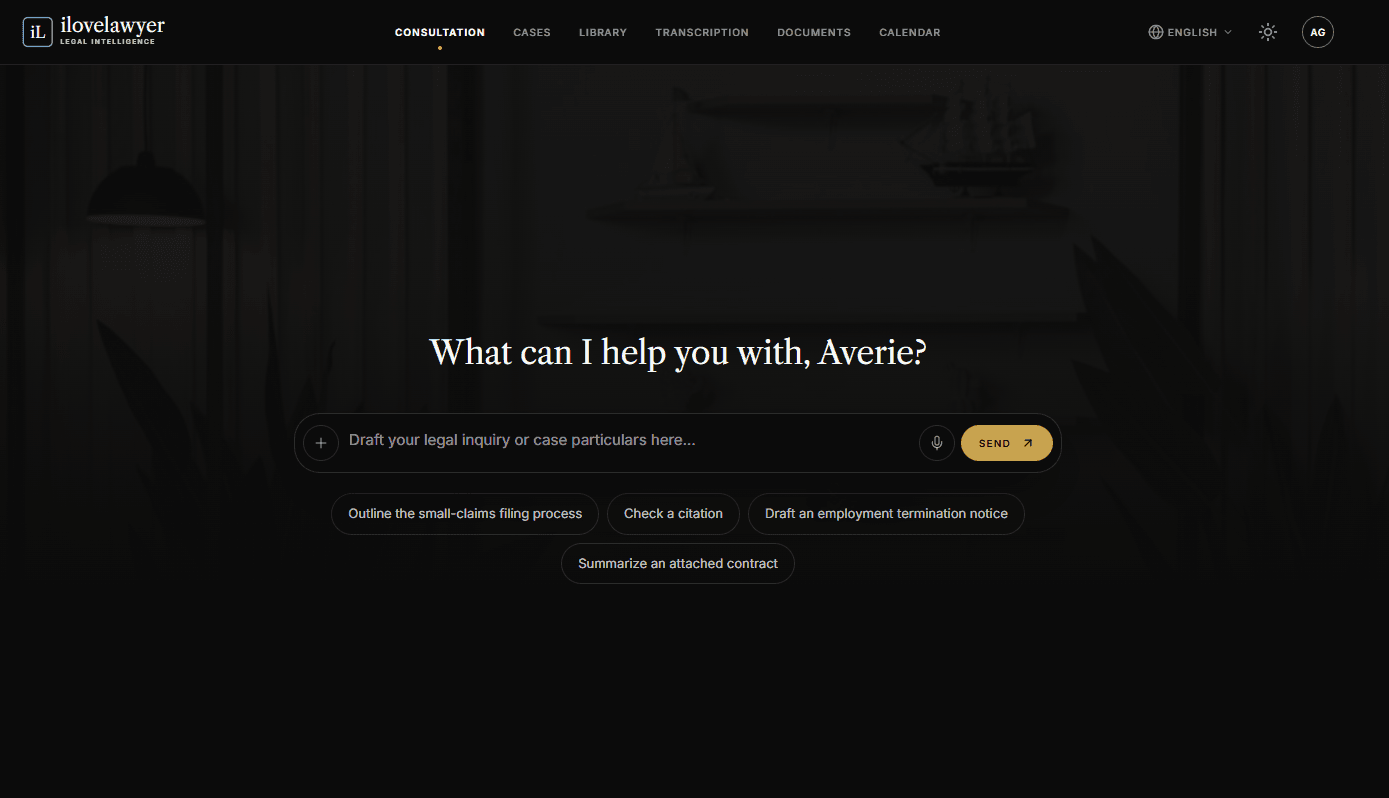
Upon logging into ilovelawyer, users are greeted with the Consultation screen, designed as the central hub and interactive workspace powered by AI. This platform operates as a knowledgeable assistant, equipped to support users in drafting legal documents, scrutinizing case details, and investigating legal strategies.

At the heart of the interface is the Interactive Composer, prominently positioned to prompt users with the message, "Draft your legal inquiry or case particulars here...". This functionality allows users to submit their questions, attach relevant files as clickable previews, or record inquiries using voice commands.

To facilitate ease of use, the system includes Quick-Start Prompt Suggestions. These pre-configured query chips cover topics like Assessing illegal-dismissal remedies, Clarifying the statute of limitations for claims, Drafting cease-and-desist letters, and Summarizing attached contracts—streamlining the process for users to engage with common legal tasks effectively.

The design incorporates a Persistent Chat History feature in the left sidebar, which keeps a record of all recent consultations. This area includes a Gallery and a fast-access "New chat" button, empowering users to rename, delete, or revisit previous discussions effortlessly. Each chat thread possesses a unique link in the address bar that remains intact during refreshes, ensuring users do not lose their progress.

When a consultation is associated with a specific case, an Integrated Case Hub panel appears adjacent to the chat, enhancing functionality. This feature permits users to execute various quick actions, including adding documents, updating schedules, attaching transcriptions, or scheduling appointments, all without leaving the chat interface.

Moreover, the platform boasts Advanced AI Outputs & Actions, where AI-generated responses can pull in related legal precedents tagged as "Vetted" when applicable. An additional Mind Map tab emerges next to the Chat and Timeline, providing a visual representation once a sufficient amount of conversation history has accumulated.

Importantly, any answer produced by the AI can be easily converted into an editable email draft using the built-in "Compose email" shortcut. The AI Legal Consultation capability effectively reduces the gap between legal research and the drafting process, offering professionals a versatile environment to expedite their case preparations.

Share this article

> related

    01
    Technology

    Ilovelawyer: Enhancing Coordination in Legal Practices

    02
    Technology

    Ilovelawyer Transforms Legal Practice Through AI-Driven Case Management

    03
    Technology

    FORHU Inc. Defines the Future of Enterprise AI Governance at VivaTech 2026

    04
    Technology

    Forhu: Pioneering a Transparent Future for Artificial Intelligence

$db.technews_

Infrastructure, data, and the systems that run everything else.

»Sections
  • Home
  • All Stories
  • Archive
  • Contact
»Topics
  • Artificial Intelligence
  • Software Development
  • Consumer Tech
  • Cybersecurity
  • Startups
»Newsletter

The day's technology headlines, in your inbox each morning.

© 2026 DbTechnews. All rights reserved.

PrivacyTermsCookies